Line2Art: Sketch & Trace in AR2.1
Publisher Description


Turn Your Photos into Drawings with AR
Line2art is an augmented reality drawing tool that helps you trace, sketch, and learn to draw by projecting an image onto real paper using your camera.
Place your phone above a sheet, align the reference, and start drawing with guided precision - like a modern camera lucida or digital lightbox.
This is not a traditional drawing app.
It is a real-world drawing assistant designed to help you transfer images to paper, improve accuracy, and build confidence while sketching.
How It Works
Choose a photo, illustration, or template.
The app overlays the image onto your surface using AR, so you can trace lines while still seeing your paper.
Adjust position, scale, and transparency until everything aligns perfectly, then draw at your own pace.
Key Features
AR Tracing Projector on Paper.
Project images onto paper and draw them in real space.
Photo to Drawing
Import your own photos and instantly convert them into sketch references.
Drawing Projector Tools
Move, rotate, and scale images like a professional tracing setup.
Adjustable Transparency
Create clean outlines or subtle guides depending on your style.
Stable Image Lock
Keep your reference fixed while you draw without shifting.
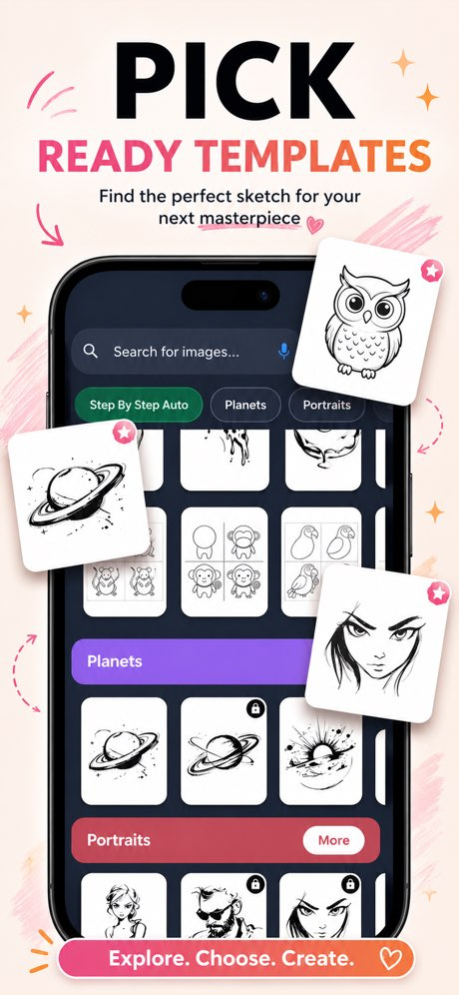
Built-in Sketch Library
Start quickly with ready-to-use references across multiple categories.
Favorites & Collections
Save ideas and return to them later for practice.
Video Learning Section
Watch guided examples and improve step by step.
Perfect For
Learning to draw with real guidance
Practicing proportions, outlines, and hand control
Sketching from photo references
Tattoo and mural planning
Fashion illustration and figure studies
Creative hobby drawing at home or in class
Whether you are a beginner learning fundamentals or an artist refining technique, Line2art helps translate what you see into confident lines on paper.
Why Artists Use AR Tracing
Seeing the structure while drawing builds muscle memory faster than copying by eye alone.
It reduces frustration, improves line accuracy, and makes complex subjects approachable.
This method complements traditional sketching - it does not replace creativity, it supports learning.
Tips for Best Results
Use a stable surface or tripod to keep alignment steady.
Start with clear, high-contrast images for cleaner tracing.
Sketch lightly first, then refine with darker lines.
Line2art turns any space into a drawing workspace.
No special equipment. Just your phone, paper, and imagination.
Start sketching, tracing, and learning with AR today.
standard Apple Terms of Use (EULA): https://www.apple.com/legal/internet-services/itunes/dev/stdeula/
Version History light version, more templates 2.1 4d ago more templates, bettter control over camera 2.0 Sep 16 bugs fixed, color by numbers added 1.9 Aug 29 Coloring books Added 1.8 Aug 22 bugs fixed 1.7 Aug 6 bugs fixed 1.6 Jul 17 morę AR templates, Editor choice category. 1,5 Jun 24 Guess Drawing game, new templates, image to sketch feature 1.4 Apr 18 easier navigation, easier drawing, change Line 2 Art! 1.3 Mar 11 fixed problem with back button 1.2 Mar 2 Nów you can make photo of your work
nicer UI
Nów you can record your work and share it 1.1 Feb 28 1.0 Feb 23
About Line2Art: Sketch & Trace in AR
The company that develops Line2Art: Sketch & Trace in AR is Michal Stachyra. The latest version released by its developer is 2.1.
To install Line2Art: Sketch & Trace in AR on your iOS device, just click the green Continue To App button above to start the installation process. The app is listed on our website since 2026-10-14 and was downloaded 0 times. We have already checked if the download link is safe, however for your own protection we recommend that you scan the downloaded app with your antivirus. Your antivirus may detect the Line2Art: Sketch & Trace in AR as malware if the download link is broken.
How to install Line2Art: Sketch & Trace in AR on your iOS device:
- Click on the Continue To App button on our website. This will redirect you to the App Store.
- Once the Line2Art: Sketch & Trace in AR is shown in the iTunes listing of your iOS device, you can start its download and installation. Tap on the GET button to the right of the app to start downloading it.
- If you are not logged-in the iOS appstore app, you'll be prompted for your your Apple ID and/or password.
- After Line2Art: Sketch & Trace in AR is downloaded, you'll see an INSTALL button to the right. Tap on it to start the actual installation of the iOS app.
- Once installation is finished you can tap on the OPEN button to start it. Its icon will also be added to your device home screen.
Program Details
System requirements
Download information
Pricing
Version History
version 2.1
posted on 2026-10-14
Version History light version, more templates 2.1 4d ago more templates, bettter control over camera 2.0 Sep 16 bugs fixed, color by numbers added 1.9 Aug 29 Coloring books Added 1.8 Aug 22 bugs fixed 1.7 Aug 6 bugs fixed 1.6 Jul 17 morę AR templates, Editor choice category. 1,5 Jun 24 Guess Drawing game, new templates, image to sketch feature 1.4 Apr 18 easier navigation, easier drawing, change Line 2 Art! 1.3 Mar 11 fixed problem with back button 1.2 Mar 2 Nów you can make photo of your work
nicer UI
Nów you can record your work and share it 1.1 Feb 28 1.0 Feb 23
version 2.0
posted on 2026-10-06
Version History more templates, bettter control over camera 2.0 Sep 16 bugs fixed, color by numbers added 1.9 Aug 29 Coloring books Added 1.8 Aug 22 bugs fixed 1.7 Aug 6 bugs fixed 1.6 Jul 17 morę AR templates, Editor choice category. 1,5 Jun 24 Guess Drawing game, new templates, image to sketch feature 1.4 Apr 18 easier navigation, easier drawing, change Line 2 Art! 1.3 Mar 11 fixed problem with back button 1.2 Mar 2 Nów you can make photo of your work
nicer UI
Nów you can record your work and share it 1.1 Feb 28 1.0 Feb 23
version 2.0
posted on 2026-09-19
Version History more templates, bettter control over camera 2.0 2d ago bugs fixed, color by numbers added 1.9 Aug 29 Coloring books Added 1.8 Aug 22 bugs fixed 1.7 Aug 6 bugs fixed 1.6 Jul 17 morę AR templates, Editor choice category. 1,5 Jun 24 Guess Drawing game, new templates, image to sketch feature 1.4 Apr 18 easier navigation, easier drawing, change Line 2 Art! 1.3 Mar 11 fixed problem with back button 1.2 Mar 2 Nów you can make photo of your work
nicer UI
Nów you can record your work and share it 1.1 Feb 28 1.0 Feb 23
version 1.9
posted on 2026-09-12
Version History bugs fixed, color by numbers added 1.9 Aug 29 Coloring books Added 1.8 Aug 22 bugs fixed 1.7 Aug 6 bugs fixed 1.6 Jul 17 morę AR templates, Editor choice category. 1,5 Jun 24 Guess Drawing game, new templates, image to sketch feature 1.4 Apr 18 easier navigation, easier drawing, change Line 2 Art! 1.3 Mar 11 fixed problem with back button 1.2 Mar 2 Nów you can make photo of your work
nicer UI
Nów you can record your work and share it 1.1 Feb 28 1.0 Feb 23
version 1.9
posted on 2026-09-05
Version History bugs fixed, color by numbers added 1.9 6d ago Coloring books Added 1.8 Aug 22 bugs fixed 1.7 Aug 6 bugs fixed 1.6 Jul 17 morę AR templates, Editor choice category. 1,5 Jun 24 Guess Drawing game, new templates, image to sketch feature 1.4 Apr 18 easier navigation, easier drawing, change Line 2 Art! 1.3 Mar 11 fixed problem with back button 1.2 Mar 2 Nów you can make photo of your work
nicer UI
Nów you can record your work and share it 1.1 Feb 28 1.0 Feb 23
version 1.8
posted on 2026-08-25
Version History Coloring books Added 1.8 3d ago bugs fixed 1.7 Aug 6 bugs fixed 1.6 Jul 17 morę AR templates, Editor choice category. 1,5 Jun 24 Guess Drawing game, new templates, image to sketch feature 1.4 Apr 18 easier navigation, easier drawing, change Line 2 Art! 1.3 Mar 11 fixed problem with back button 1.2 Mar 2 Nów you can make photo of your work
nicer UI
Nów you can record your work and share it 1.1 Feb 28 1.0 Feb 23
